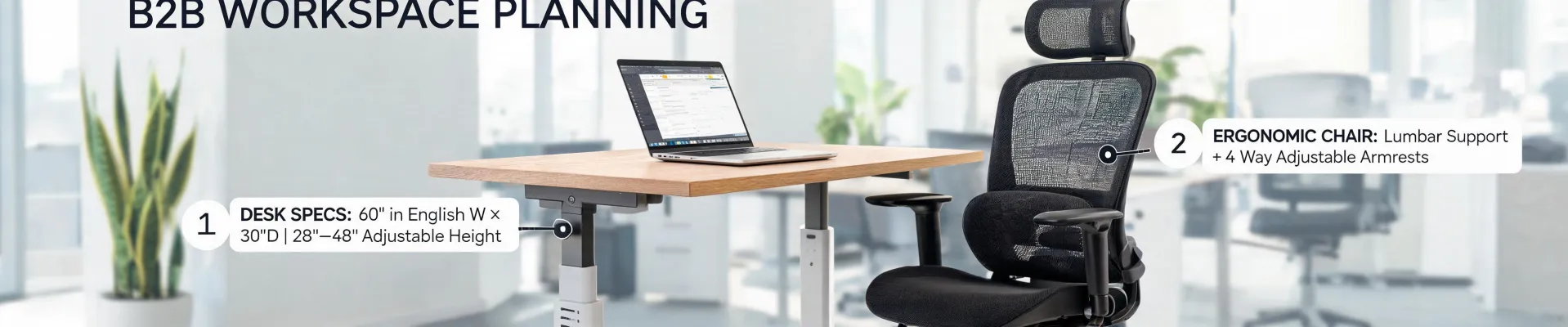
Let me save you the scroll: there is no universal "best" configuration for a Fully Jarvis standing desk. I handle office purchasing for a mid-sized services company, and after ordering desks for different teams, budgets, and even home offices, I've learned that the right choice depends very much on your situation.
That's why this guide is structured by scenario. Before diving in, here are the three situations I see most often:
- You're buying for a team at an office. Process matters: depth standardization, warranty documentation, chair setup for everyone.
- You're buying one for your home workspace. Fit matters: room size, monitor placement, and making sure the purchase doesn't create financial noise.
- You're a business owner or freelancer paying out of your own pocket. Numbers matter: budget ceilings, opportunity cost, and warranty risk.
The details that matter—depth options, warranty coverage, chair adjustment, and budget math—look different in each case. Let's go through them.
Scenario 1: Buying for the office
This was my situation a couple of years ago. We needed to replace about 30 fixed desks—actually closer to 35 when you counted the training room. Employees had been asking for standing options, and I had a limited window to get the order through before the annual budget reset.
Fully Jarvis standing desk depth options for a team
The depth options on the Jarvis tabletops (27-inch and 30-inch are the two I compared, though you should check the current product page for your market) cover most people. I chose the 30-inch for the majority of our staff. It gives enough room for a monitor arm, a keyboard, and a notepad without feeling cramped.
But I kept the 27-inch option on a handful of orders. For employees in smaller cubicles, or people who work mostly on a laptop, the extra three inches of surface depth just ate into walkway clearance. The desks are height-adjustable, but tabletop depth doesn't change. Matching the depth to the room and the person matters more than getting the biggest top.
One more thing: the L-shaped Jarvis. I originally dismissed it as a corner-office luxury, but a few of our finance people run two monitors and a calculator in a spread that a standard rectangle doesn't handle well. They got L-shaped desks, and the deeper corner was exactly what the job needed.
What to check in the warranty
Before placing any order, I read the actual warranty terms for the Jarvis desk line. Here's what I looked for:
- What's covered beyond the frame? Most height-adjustable desks cover the lifting mechanism differently from the electronics or the tabletop.
- Who pays for shipping or labor on a claim? A "parts only" warranty is a very different deal from one that covers labor.
- Whether the warranty requires registration within a certain number of days. Missing that window can void coverage.
Per FTC guidance, written warranties must state clearly whether they are "full" or "limited"—and "limited" is far more common. That distinction tells you who covers labor and shipping if something fails. It's not a legal nicety; it changes the total cost of a claim.
I once nearly saved about $50 per desk by ordering through an unverified reseller. Then I noticed the warranty required proof of purchase from an authorized dealer. That "savings" would have evaporated the first time a controller unit failed. I re-ordered through the authorized channel and documented every serial number.
Don't forget the chairs
A standing desk doesn't fix your posture by itself. The chair matters just as much. After the desks arrived, I ran a 15-minute chair setup session for each team member. The sequence for how to adjust an office chair for comfort is simple:
- Set seat height so your feet are flat and your knees are at about 90 degrees.
- Check seat pan depth—you want two or three fingers of space between the seat edge and the back of your knees.
- Adjust lumbar support so it sits in the curve of your lower back, not up near your shoulders.
- Set armrests so your shoulders are relaxed and your elbows are at roughly 90 degrees.
- Re-check after a week. Your body needs time to settle into the new setup, and small tweaks make a big difference.
When someone works standing, the chair height changes too. Raise it slightly when the desk is at standing height so you can sit for quick breaks without lowering the desk. It's a small thing that makes the desks feel more useful throughout the day.
Scenario 2: Buying for your home office
Individual purchases are different from office roll-outs. The first question isn't "what's the best desk?"—it's "what fits this room, and what do I actually do at this desk?"
Depth options for a home setup
Here's the counter-intuitive part: the 27-inch depth is often the more honest choice for a home office. A 30-inch deep top plus chair clearance can swallow a spare bedroom. And if you're working on a laptop, the extra depth doesn't help—you'll just have more empty desk to keep clean.
If you're running one large monitor or two smaller ones, the 30-inch depth earns its space. You need enough distance between your eyes and the screen to avoid neck strain, and extra depth lets you position the monitor further back. Measure your room and your monitor setup before deciding.
Warranty: register it immediately
The habit that saves the most hassle is registering the product as soon as it arrives. I've wasted an afternoon digging through email receipts after a part failed, and I wouldn't wish that on anyone. Take two minutes when the desk arrives: save the order email, take a photo of the spec sheet, and put them in a folder called "Warranty." Future you will be grateful.
The budget math
If you're spending your own money, this is where a limit calculator helps. You plug in your annual budget for home office improvements, subtract what you've already spent, and it shows your remaining ceiling. It sounds like overkill for one desk, but it stops the "I'll just add one more accessory" spiral that turns an $800 desk into a $1,300 project.
Then there's the bigger question: should this purchase worry you financially? That's where a coast fire calculator is useful. It tells you how much you'd need saved today to hit your retirement target without making further contributions. Running your numbers through one takes about a minute, and it changes the conversation from "can I afford this desk?" to "does this desk fit the financial direction I'm already on?" If you're behind on your goals, that's worth knowing before you choose the premium tabletop. If you're ahead, you can stop feeling guilty about a purchase you've been eyeing for months.
I know it sounds like a lot of calculation for a desk. But a desk is something you'll use every workday for years. Running the numbers once is more efficient than buying the wrong thing and redoing it.
Scenario 3: Buying as a business owner or freelancer
Smaller companies blur the line between personal and business spending. One moment you're buying a desk to improve your work-from-home setup; the next, you're wondering if that money should have gone into a retirement account instead.
Depth options on a budget
When money is tight, the depth options become a straight tradeoff. The 27-inch rectangle is the budget-friendly choice that still gives you full height adjustability—you're not losing the standing function, just the extra surface. If your work is mostly on a laptop with an occasional external monitor, that's a reasonable compromise. I wouldn't recommend the L-shape on a strict budget unless you genuinely need the corner workspace.
Warranty as risk management
For a business purchase, the warranty isn't paperwork—it's a risk management tool. If you're buying one desk for your home office, a warranty claim is a mild inconvenience. If you're buying six for your team, the cost of a failure isn't just a replacement part; it's the disruption to your team's working days. Verify that the warranty for business orders matches the consumer one, and check whether you need to buy through a specific channel to stay covered.
Running the numbers
I'll admit it: I used to be skeptical about the calculator crowd. But after watching a friend who runs a small consultancy, I've changed my mind. She plugs every purchase into a limit calculator before committing. It's not about being cheap—it's about having a ceiling she chose, instead of discovering the ceiling after the invoice arrives.
The coast fire calculator plays a role here too. For business owners, a significant purchase is a tradeoff against the future. The calculator shows the target you'd need saved today to coast into retirement without additional contributions. Suddenly you're not just asking "what does this desk cost?" You're asking "what does this desk cost in terms of compound growth?" That mental shift is valuable even if the answer still ends up being "yes, buy the desk."
And here's the twist: sometimes the calculators tell you to buy the nicer desk. If the desk keeps you working without back pain, if it makes your work sessions longer and more productive, it's not an expense—it's a tool that pays for itself. The calculator just ensures you're making that choice consciously instead of accidentally.
The chair, again
In every office I've helped set up, the chair is where comfort goes to die. A good chair doesn't remove the need for proper adjustment. Use the same sequence I described earlier: seat height, seat pan depth, lumbar, armrests. Fifteen minutes now saves you months of small aches.
How to figure out which scenario you're in
Sometimes it's obvious. Equipping a new office? Scenario 1. Setting up a corner of your bedroom for remote work? Scenario 2. Running your own business and buying for yourself or a tiny team? Scenario 3.
But there's overlap. If you're equipping a home office for work you do as a contractor, you're both an individual buyer and a business buyer. When in doubt, apply the stricter standard: measure your room, read the warranty terms carefully, run the numbers with a limit calculator and a coast fire calculator, and adjust your chair properly.
My experience is based on mid-sized professional services purchases—about 150 pieces of office furniture over five years. If you're outfitting a medical clinic or a warehouse break room, some specifics will look different. But the decision framework stays the same: match the desk to the space, understand the warranty, pair it with a properly adjusted chair, and check the numbers before committing.
The expensive mistake isn't buying a desk that costs too much. It's buying one that doesn't fit—your space, your people, your budget, or your body. Fit is what makes a standing desk worth it. That's true whether you're ordering thirty-five or just one.
